
iPhone/iPad: install with AltStore/SideStore
TRS Launcher runs on iPhone and iPad too. It isn't in the App Store – you sideload it with AltStore or SideStore, which sign the app with your own Apple ID and keep it up to date from our source.
| You need | |
|---|---|
| iOS / iPadOS | 15 or newer |
| Sideloading | AltStore or SideStore (or TrollStore, if your iOS version supports it) |
| Apple ID | A free one is enough – the app then has to be refreshed every 7 days |
| Account | A Microsoft account that owns Minecraft: Java Edition |
| To play | JIT – see Enable JIT |
Install
Install AltStore or SideStore
If you don't have one yet, set up AltStore (with AltServer on a Windows PC or Mac) or SideStore (refreshes on the device itself) by following the official guide of that app. It's the hardest step – after that everything happens on the phone.
Add the TRS source
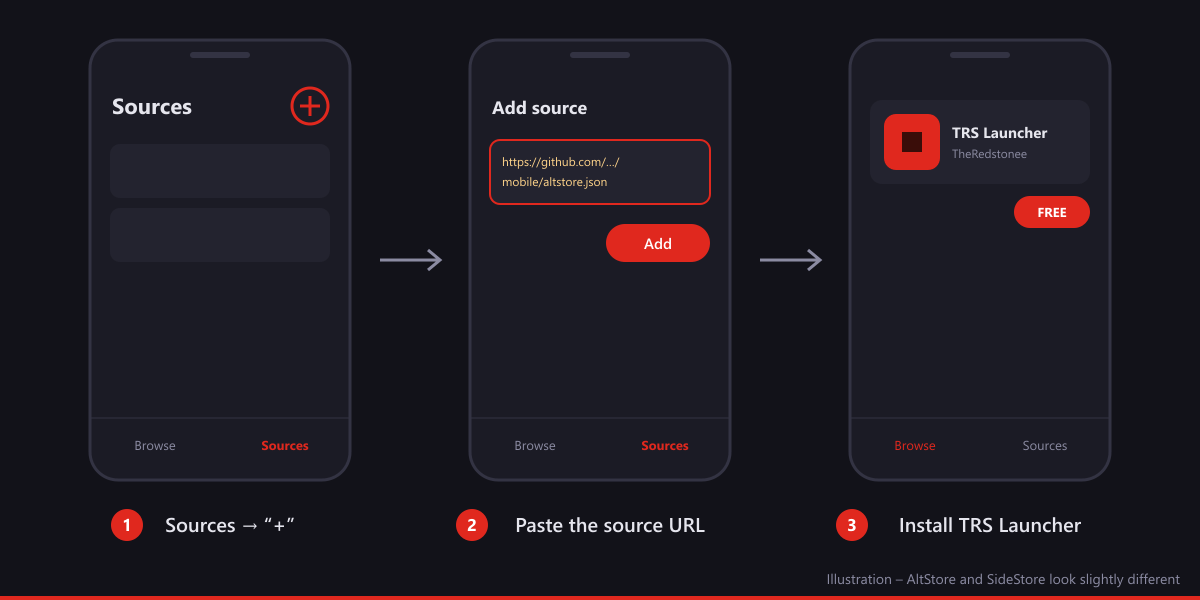
On your iPhone or iPad, open the download page and tap Add to AltStore or Add to SideStore. Or add it by hand: in AltStore/SideStore open Sources, tap + and paste this URL:
https://github.com/theredstonee/TRS-Launcher/releases/download/mobile/altstore.json
Install TRS Launcher
Open the source TRS Launcher, tap the app and then Free / Install. AltStore or SideStore signs it with your Apple ID and installs it. Keep the app open until it's done.
Open the app
TRS Launcher now shows up on your home screen. On iOS 16 and newer, iOS may ask you to turn on Developer Mode first (Settings → Privacy & Security → Developer Mode); the phone restarts once.
Enable JIT
Minecraft runs on Java, and Java needs JIT (just-in-time compilation) to be fast enough. iOS only allows JIT for sideloaded apps in special ways. Pick the one that fits your setup:
For iOS 17.4 and newer, completely on the device:
- Install StikDebug (for example from SideStore) and set it up once as its own guide describes (pairing file).
- Open StikDebug and choose TRS Launcher from the list – StikDebug starts the app with JIT enabled.
- Start your instance in TRS Launcher.
Do this every time you want to play; StikDebug has to be used again after the app was closed.
With AltServer on your PC or Mac on the same Wi-Fi (or connected by cable):
- Make sure AltServer is running.
- In AltStore open My Apps, press and hold TRS Launcher and choose Enable JIT – or use Enable JIT in AltServer's menu on the computer (AltJIT).
- TRS Launcher opens with JIT; start your instance.
Repeat this whenever the app was closed completely.
First start and sign-in
Language and welcome
Pick your language; the short setup works like on the PC.
Sign in with Microsoft
Tap Sign in. The app shows a short code and opens Microsoft's page. Enter the code there and sign in with the account that owns Minecraft: Java Edition. Your password only goes to Microsoft.
Play
Create an instance (Your first instance), make sure JIT is on and tap Play. The game files come from Mojang, the TRS Client is loaded by itself and the touch controls are the same as on Android – see Touch controls.
Notifications
Under More → Settings → Notifications you switch on notifications for chat messages, friend requests and invitations (the TRS online features must be on). iOS has no ntfy: the app checks in the background for new messages and shows them as notifications. iOS decides how often that happens, so notifications can come late – especially when the phone is in Low Power Mode or the app wasn't used for a while.
Updates and the 7-day limit
- Updates: when a new version is in our source, AltStore/SideStore shows an update – tap Update. Your instances and sign-in stay.
- Refresh every 7 days: apps signed with a free Apple ID stop opening after 7 days. Open AltStore or SideStore regularly and tap Refresh All (AltStore needs AltServer reachable for that, SideStore does it on the device). If the app already expired, refreshing it brings it back – nothing is lost.
- A free Apple ID allows only 3 sideloaded apps at the same time, and AltStore/SideStore counts as one of them.
Problems
The game closes right after starting
Almost always JIT is not active. Start TRS Launcher again through StikDebug, AltStore/AltServer or TrollStore as described above, then start the instance. If it still crashes, open the instance, go to the log and tap Share log – it uploads the log to mclo.gs with your username and secrets removed. The crash helper explains many crashes in plain words.
Minecraft 26.3 doesn't start
Minecraft 26.3 is not supported on iPhone and iPad yet. Use 26.2 or older for now.
The game runs out of memory
See the memory warning above: smaller modpacks, lower render distance, close other apps.
"Unable to verify app" or the app doesn't open any more
The 7 days are over. Open AltStore/SideStore and refresh the app.
Adding the source doesn't work
Make sure you copied the full URL, including https:// and altstore.json. If the buttons on the download page do nothing, AltStore/SideStore isn't installed – add the source by hand instead.
No notifications
Allow notifications for TRS Launcher in iOS Settings → Notifications, keep Background App Refresh on for the app and open it now and then – iOS checks less often for apps you rarely use.
If nothing helps, report a bug and include the log link.