
Minimap, waypoints and world map
Minimap
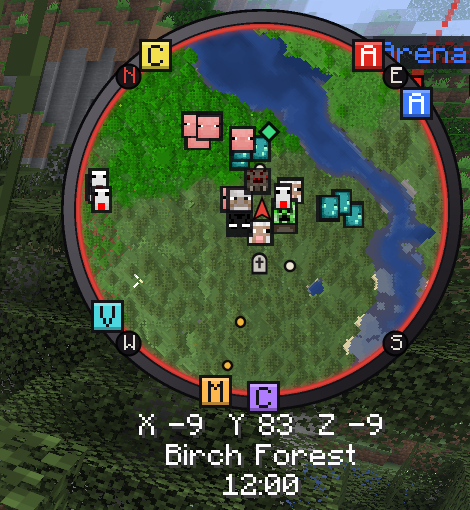
The minimap is off by default. Turn it on in the TRS menu under World → Minimap; move and resize it in the HUD editor.
It shows real block colours (taken from the textures of your resource pack), biome-tinted grass, leaves and water, soft relief shading and water that gets darker with depth. Underground and in the Nether it switches to a cave view on its own, and under a roof it shows the inside of the building instead of the roof.
| Setting | Default |
|---|---|
| Shape | Round (or Square) |
| Size (pixels) | 112 (64 – 256) |
| Zoom | Normal (Very far, Far, Normal, Near, Very close) |
| Rotate with view | on |
| Auto zoom: further out when fast / closer indoors and in caves | on / on |
| Map opacity | 100 % |
| Map colors | Block textures (or Vanilla map colors) |
| Cave view | Automatic (or Off) |
| Hide roofs (show the inside of buildings) | on |
| Show waypoints / waypoints out of view at the map edge | on / on |
| Show last death point | on |
| Show players / highlight TRS friends | on / on |
| Show hostile mobs / show animals | off / off |
| Creatures as | Heads (or Symbols) |
| Compass directions, coordinates and biome below the map | on |
| Time of day below the map | off |
Waypoints outside the map sit as small coloured boxes with their first letter on the ring and point the way.
Fair Play
Fair Play turns off everything a map could use to cheat, for the minimap and the world map together:
- no cave view and no indoor view,
- players and mobs only show up when you could actually see them.
Switch it on yourself
Minimap → Fair Play (maps show only what you could see), or the Fair Play switch on the world map page.
Or let the server decide
Servers that ask map mods for fair play (the common Xaero codes in chat or the server description) are respected automatically. A server can also turn the minimap off completely – the minimap page then tells you.
Waypoints
Create a waypoint
Press B, pick a name and a colour, and save. It is created where you stand.
Manage your waypoints
Press N or click Manage waypoints on the Waypoints module page: edit, hide or delete.
Find your way
In the world, each waypoint shows a light beam and its distance. After you die, a death point is set automatically.
Waypoints are saved per world or server on your PC. Only up to (blocks, 0 = always) hides far waypoints. The keys B and N are set on the module page (they are not in the Minecraft controls).
x: 100 y: 64 z: -20 or 100 64 -20) are underlined – one click saves them as a waypoint. This happens only on your PC.World map
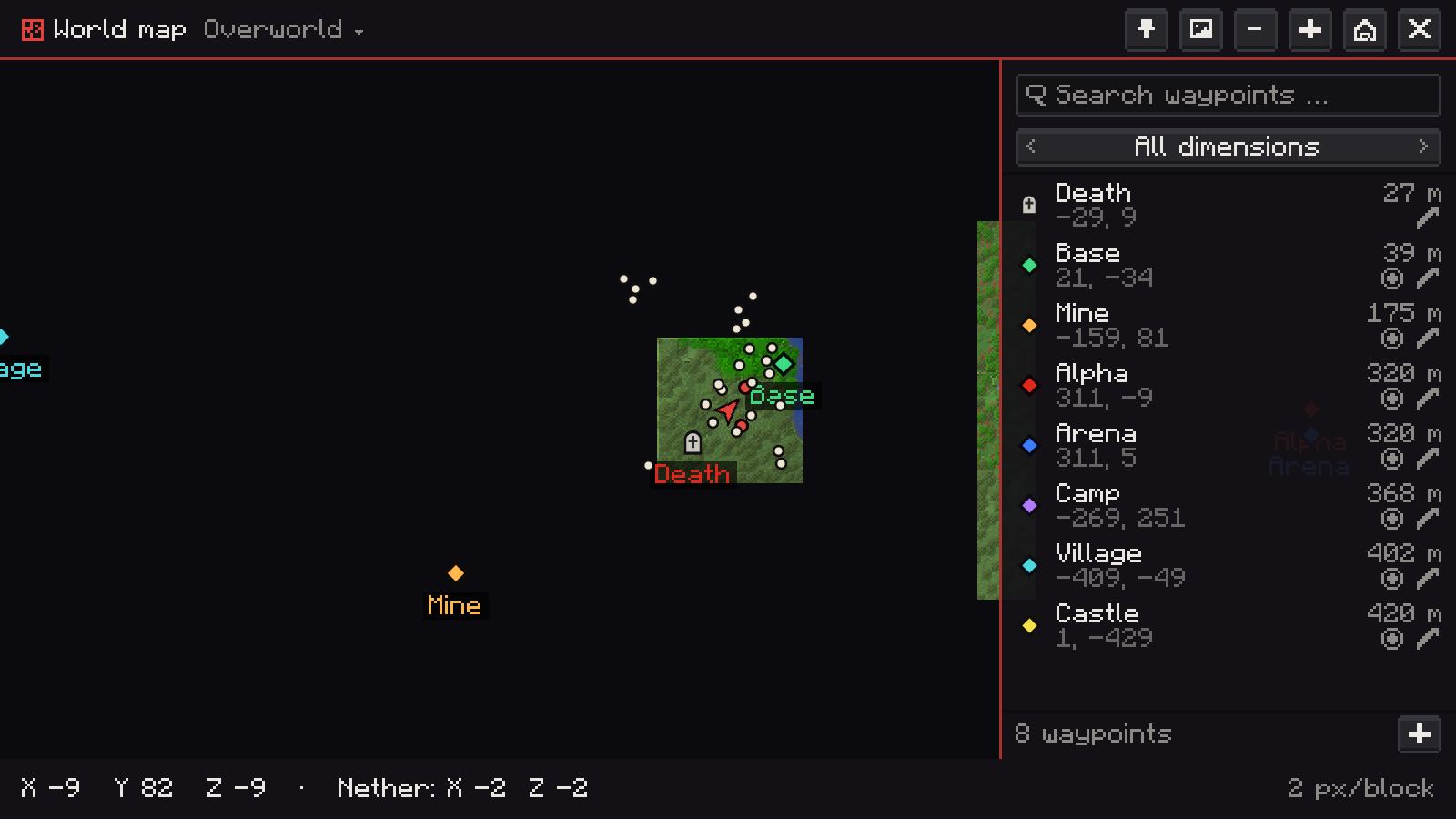
Press M to open the fullscreen world map. Everything you have explored stays on it – saved per world, server and dimension on your PC. If another map mod already uses M, the TRS key starts unbound instead of clashing.
- Drag to move; after letting go, the map glides on for a moment.
- Mouse wheel zooms smoothly towards the mouse pointer.
- Right-click opens a menu: Create waypoint here, Edit, Hide, Delete, Center here, Follow me and Share with friends.
- Center on me jumps back to your position; the bottom bar shows the coordinates under the cursor.
- The level button switches between surface, cave levels and indoor level.
Waypoint list
The pin button opens a list of all waypoints of this world: search by name or coordinate, filter by dimension, see the distance (Nether and Overworld converted ×8) and turn each one on or off. Click a waypoint to center the map on it, the pencil edits it, + adds one in the middle of the map.
Other dimensions
Click the dimension name at the top to look at the Nether, the End or other dimensions of this world you have mapped – without going there. In the Nether and the Overworld the bottom bar also shows the matching coordinates of the other side (×8 or ÷8), handy for portals.
Export as image
The image button saves Whole explored map or Visible area only as a PNG in your screenshots folder. Unexplored parts stay transparent, very large maps are scaled down to the export size (default 8192 pixels). The export runs in the background and a chat message tells you the file name.
World map settings
Show waypoints, players, hostile mobs and animals, chunk grid when zoomed in, smooth zoom, keep gliding after dragging, view other dimensions, matching Nether/Overworld coordinates, export size and Map storage on disk (default 256 MB – the oldest areas are removed first).
Share waypoints with friends
With the TRS online features you can send a waypoint – or where you stand – to a friend or group in the social chat. It arrives as a card with name, coordinates, dimension and server. Your friend can Save it as their own waypoint (on the same server or in the same world) or Show it on the map.
Version notes
Zoom, freelook and toggle sprint
Smooth zoom on V, freelook on Left Alt and toggle sprint and sneak in the TRS Client – keys, settings and server rules.
Redstone tools
See the signal strength of redstone parts, show numbers over every piece of dust with the signal overlay and measure clocks with the TRS Client.