
Redstone tools
The category Redstone of the TRS menu has three tools for building circuits. The Redstone module pack under Presets turns on everything you need, with a matching HUD layout.
Signal Strength
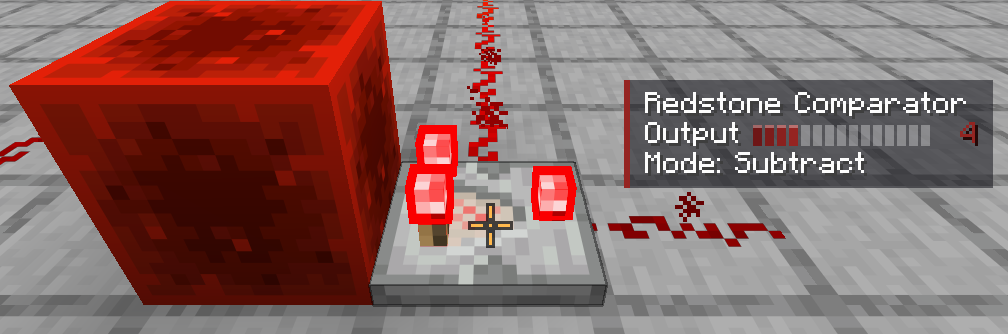
Look at dust, repeaters, comparators, pistons, lamps, levers and more. The HUD element shows:
- the block name and its signal strength (0 – 15) with a signal bar,
- the delay of a repeater (and whether it is locked),
- the mode of a comparator (compare or subtract) and its output,
- whether a piston is extended or retracted,
- the comparator output of containers.
Settings: Block name, Signal bar, Details (delay, mode, state). On by default.
Signal Overlay
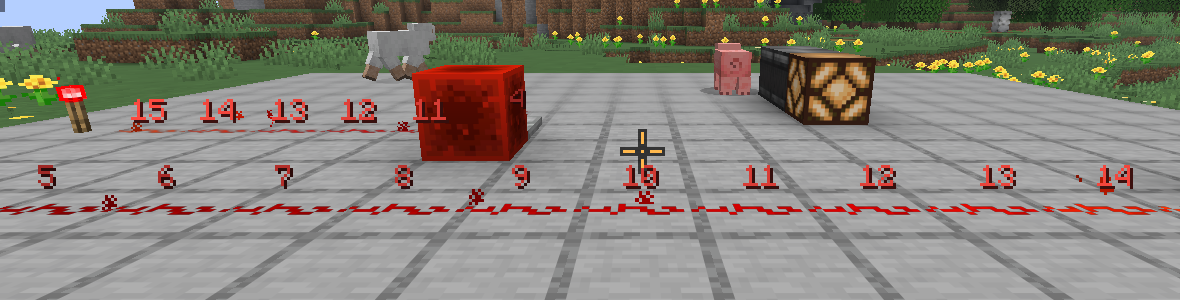
Shows the signal strength as a number above every piece of redstone dust around you – from grey (0) to bright red (15). Switch it on and off with its key:
| Setting | Default |
|---|---|
| Radius (blocks) | 8 (4 – 16) |
| Only dust in sight | on |
| Also label 0 | on |
Clock Meter
Measures how fast the redstone part you look at switches: frequency in Hz, period and pulse length in redstone ticks (rt) and game ticks (gt), plus a small oscilloscope. It only appears while a part is actually switching.
| Setting | Default |
|---|---|
| Measuring window (s) | 5 |
| Oscilloscope | on |
| Keep measuring after looking away | on |
Version notes
Minimap, waypoints and world map
The TRS Client minimap with cave view and Fair Play, waypoints with light beams, and the fullscreen world map with dimensions and PNG export.
Circuit library
Ready-made redstone circuits in the TRS Client – browse them in 3D, show them as ghost-block templates in your world and submit your own.