
PvP modules
The PvP modules sit in the category PvP of the TRS menu. The quickest start is the PvP module pack under Presets.
Displays
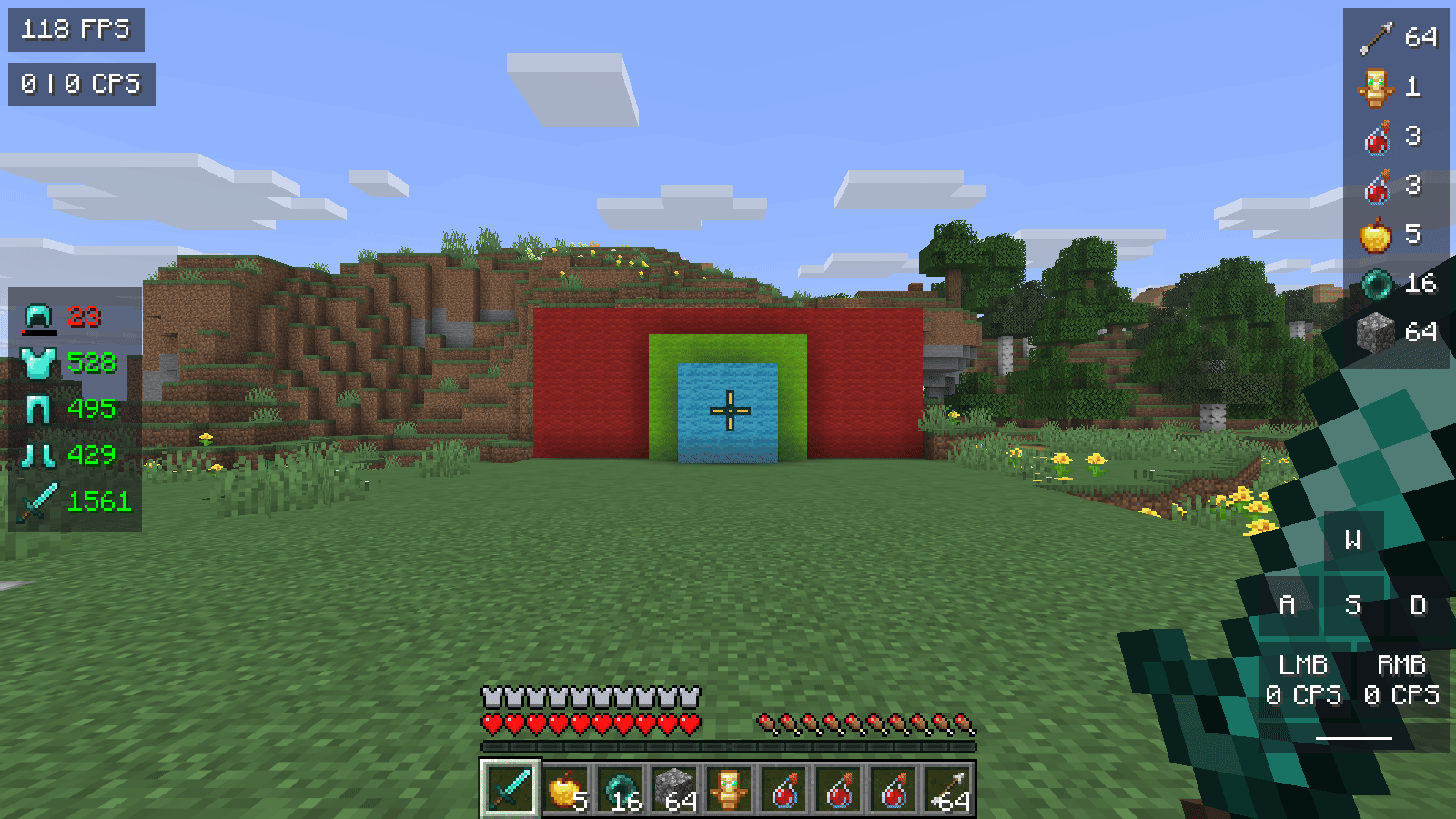
| Module | What it shows | Settings |
|---|---|---|
| Keystrokes | WASD, mouse buttons and space bar | CPS below mouse buttons, show space bar |
| CPS | Clicks per second (left | right) | – |
| Armor | Worn armour with durability, optionally the held item | Durability in percent, Orientation vertical or horizontal |
| Reach | Distance of your last hit | Decimal places, display time |
| Combo | Hits in a row – ends when you get hit or stop hitting | Also show best combo, combo ends after (s) |
| Speed | Blocks per second | Count height changes |
| Item Counter | Arrows, totems, healing and splash potions, golden apples, ender pearls and blocks in your inventory | Each counter on/off, hide empty counters, orientation, Totem pops of opponents (from 1.11) |
Ping display
The Ping module shows the real round-trip time to the server, the jitter (±) and a small history graph. Optionally it adds the server's TPS (an estimate) and timeouts, and warns you about ping spikes.
Crosshair and hit effects
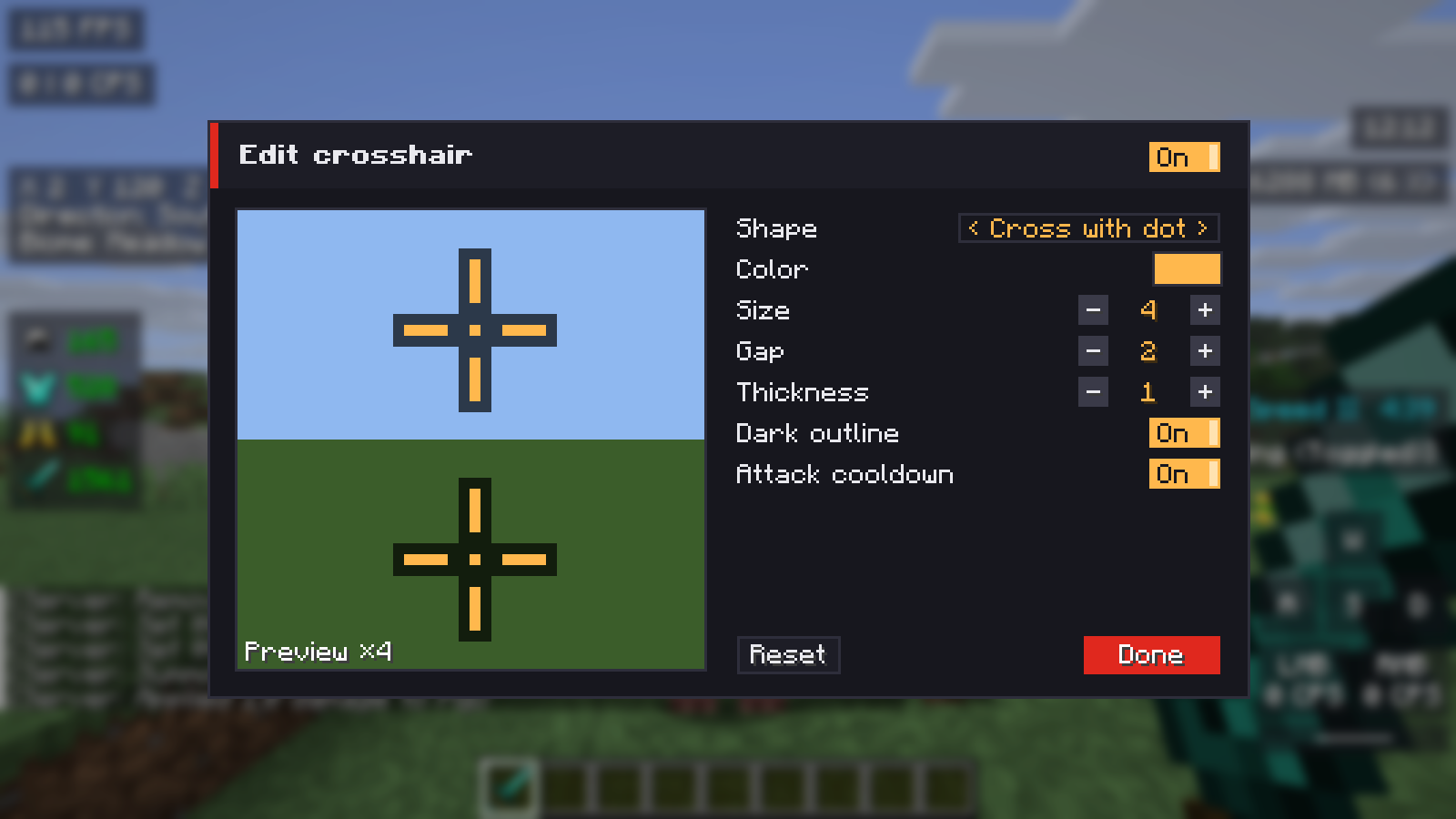
- Crosshair – your own crosshair: cross, cross with dot, dot, T shape, circle or circle with dot, with colour, size, gap, thickness, dark outline and the attack cooldown. The button Edit crosshair opens a live editor.
- Hit Color – the colour mobs and players flash in when hit, with opacity.
- Hit Feedback – a hit marker at the crosshair when your hit lands, more critical and sharpness particles (1× to 5×) and an optional hit sound.
- Block Outline – colour, opacity and width of the outline around the block you look at.
- Hitboxes – shows the hitboxes of mobs like F3+B, in a colour of your choice.
Hand and camera
- 1.7 Animations – the hand does not dip during the attack cooldown, and it swings while you use an item (visual only).
- Low Fire – pulls the flames at the edge of the screen down while you are burning.
- No Hurt Cam – the camera no longer tilts when you take damage.
Shield Position
Holds your shield further to the side and lower in first person, so you see more of the fight. While blocking it switches smoothly to its own flatter pose.
Turn it on
TRS menu → PvP → Shield Position.
Pick a preset
Side, Low or Vanilla – or set position, rotation and size yourself for Normal and Blocking (the preset then shows Custom).
Check the preview
The live preview on the settings page shows how much of the screen the shield covers.
Optional: see-through while blocking
See-through while blocking with an adjustable opacity.
Third person stays unchanged, and shields from other mods work too.
Auto GG
Sends your message (default "gg") exactly once when a round ends – 0.5 to 2 seconds later and at most every 10 seconds. It knows the end-of-round messages of Hypixel, Minemen and PvP.Land, and you can add your own triggers. Off by default – only use it where it is allowed.
Version notes
- Hit Color is not available on 1.7.10, 1.8.9 – 1.12.2, 1.13.2 and Forge 1.14.4.
- Low Fire is not available on 1.8.9 – 1.12.2.
- Shield Position works from 1.10.2 (Forge) and 1.14.4 (Fabric) up to 26.3, not on 1.13.2 and Forge 1.14.4.
- Item Counter and Hit Feedback are not available on 1.7.10 and 1.13.2; Hit Feedback also not on Forge 1.14.4.
- On Forge 1.14.4, Reach, Combo, Low Fire, Block Outline, No Hurt Cam and Auto GG are missing.
Performance and FPS
More FPS with the TRS Client – FPS Boost levels, performance check, frame limit, Dynamic FPS, entity culling, particles and built-in optimizations.
Zoom, freelook and toggle sprint
Smooth zoom on V, freelook on Left Alt and toggle sprint and sneak in the TRS Client – keys, settings and server rules.