
Performance and FPS
All performance modules sit in the category FPS of the TRS menu. They are saved in your HUD profiles, so a PvP profile can run with other settings than a building profile.
FPS Boost
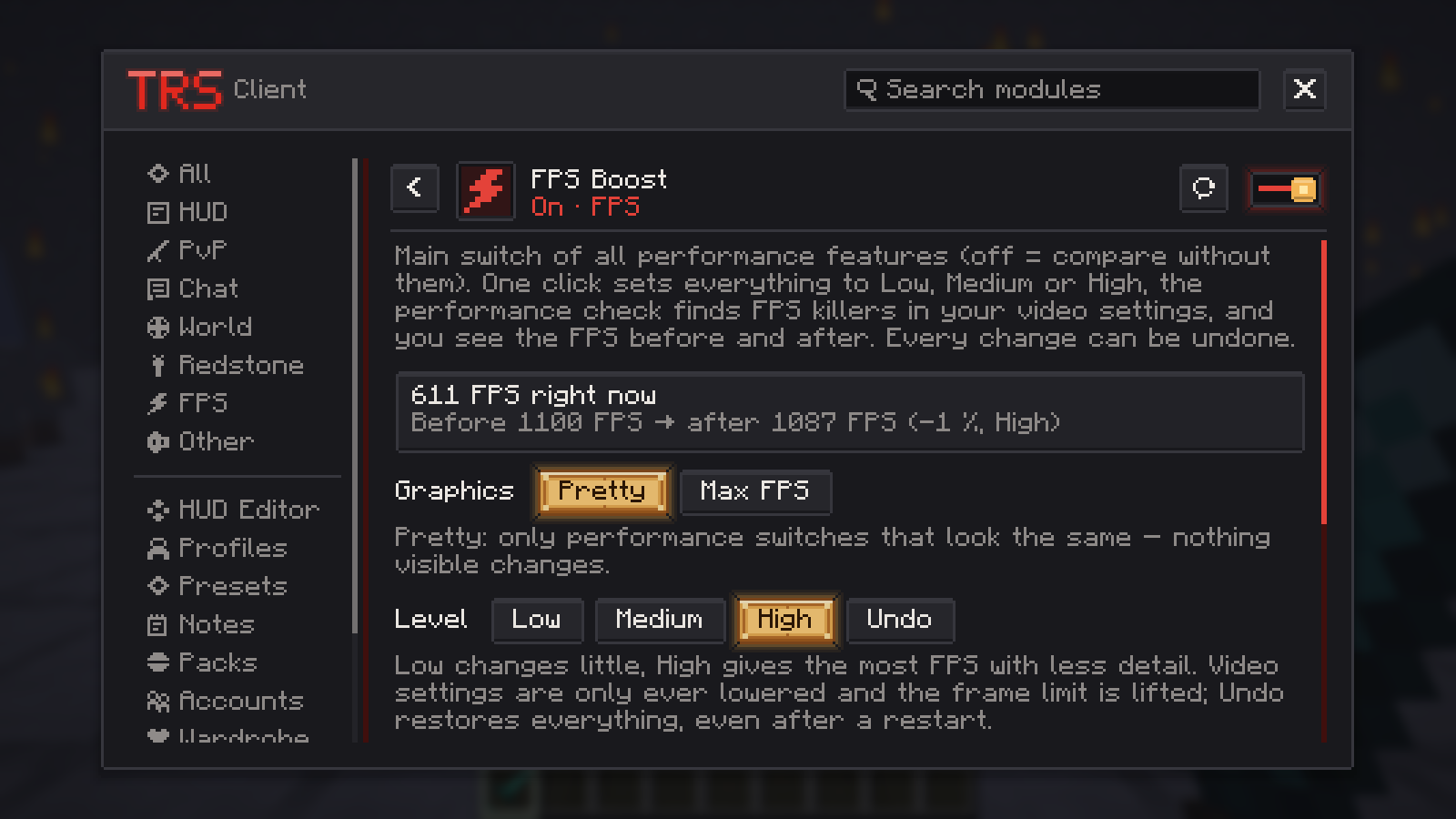
FPS Boost is the main switch of all performance features – turn it off to compare the game without them. Its page has three parts:
Pick a level
Low, Medium or High. Low changes little, High gives the most FPS with less detail. Video settings are only ever lowered, and the frame limit is lifted. The page shows the FPS before and after.
Pick the graphics mode
Pretty keeps the look and only uses performance switches. Max FPS turns off clouds and smooth lighting, lowers particles and uses fast graphics and fast leaves. Settings you changed yourself stay as they are. You can also choose this in the launcher's instance settings under Graphics mode.
Run the performance check
The Performance check lists FPS killers in your video settings – for example VSync, a frame limit, a high render or simulation distance, "Fabulous" graphics or Minecraft running on the onboard graphics although a graphics card is installed. Fix or Fix all changes them.
Frame limit and VSync
Minecraft starts with VSync on and a frame limit, which can hold a strong PC at around 100 FPS. New instances from the TRS Launcher start with an unlimited frame rate and VSync off; existing instances keep your settings.
- The performance check flags a frame limit below "Unlimited" and lifts it with one click. Every FPS Boost level lifts it too.
- In Options → Video Settings set Max Framerate to Unlimited and turn VSync off for the highest FPS.
- The introduction also has a step for the frame limit and VSync.
Dynamic FPS
Limits the frame rate while the game is in the background, minimized or while you are AFK, and makes the game quieter. You get full FPS the moment you come back. On by default.
| Setting | Default |
|---|---|
| FPS in the background | 15 |
| FPS when minimized | 1 |
| FPS when AFK (0 = off) | 0 (off) |
| AFK after (minutes) | 3 |
| Quieter in the background / Background volume | on / 30 % |
Entity Culling, Particles and World Details
These three are off by default.
- Entity Culling skips drawing mobs, chests, signs, dropped items, item frames and name tags that are hidden behind walls or further away than you set. Always show players at any distance keeps players visible. Display only – nothing changes in the world.
- Particles sets a maximum number of particles and an amount in percent, and can switch off explosion particles, rain splashes and smoke.
- World Details can hide the sky, the stars, distance fog, rain and snow and texture animations (water, lava, fire). Only what works cleanly in your version is offered.
If you already use a mod that does the same job (for example Sodium, OptiFine, EntityCulling or Dynamic FPS), the TRS Client detects it and leaves that part to it – the page shows "Taken over by …".
Built-in Optimizations (Fabric)
On Fabric the TRS Client brings free performance mods along – Lithium, FerriteCore, ImmediatelyFast, ModernFix and BadOptimizations, wherever they exist for your Minecraft version. If you install one of them yourself, your newer version is used. Switching them off takes effect at the next start through the TRS Launcher.
Network Optimization
Processes incoming packets faster on your PC: faster decryption on online-mode servers and compression without extra copies. On 1.7.10 it also switches on TCP_NODELAY, which Minecraft leaves off there. On by default.
Low Input Latency
Shortens the time from moving the mouse to seeing it on screen: it limits how many frames wait in the graphics card queue and reads your input right before each frame. Balanced allows one waiting frame, Maximum none. It helps most when the graphics card runs at full load and costs a few percent FPS. The module page shows the measured values live. Off by default; needs OpenGL 3.2 for the queue limit.
Colors and Fullbright
Two picture modules in the category World:
- Colors changes saturation, contrast, brightness, vibrance and colour temperature of the game image. The HUD and menus keep their colours, and it pauses while a shader pack is active. Not available on 1.7.10, 1.13.2 and Forge 1.14.4.
- Fullbright gives maximum brightness everywhere. You can bind a key for it (Toggle fullbright, unbound by default).